Athlete App Sign In
Step-by-step guide to signing in to The FitCorp mobile app as an athlete. The sign-in process takes approximately 3-5 minutes.
Before You Start
Make sure you have the following ready:
- The FitCorp app downloaded on your mobile device (iOS or Android)
- Your personal email address ready
- Access to your email inbox to receive the sign-in code
- Your mobile device with internet connection
Download The FitCorp App
For iOS (iPhone/iPad)
- •Open the App Store on your device
- •Search for "The FitCorp"
- •Tap "Get" to download the app
- •Authenticate with Face ID, Touch ID, or your Apple ID password
- •Wait for the app to download
For Android
- •Open the Google Play Store on your device
- •Search for "The FitCorp"
- •Tap "Install"
- •Wait for the app to download
Expected result: The FitCorp app is installed on your phone and ready to open.
Open The FitCorp App
- •Tap the FitCorp app icon on your home screen
- •The app will launch and show the sign-in screen
- •You'll see "Sign In" at the top with the FitCorp logo
Expected result: The app opens and shows the sign in screen.
Choose Your Sign-In Method
You have 3 options to sign in:
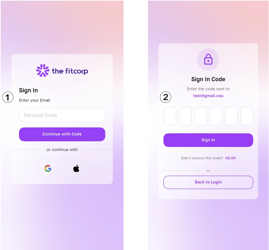
Option 1: Continue with Code
- •Enter your email address
- •Tap the purple "Continue with Code" button
- •You'll receive a sign-in code at your email
- •Check your email for the code (takes 1-2 minutes)
- •Enter the code on the next screen
- •Tap "Sign In" to complete

Important: The code is 6 digits long, valid for 1 hour. You can request a new one if it expires.
Option 2: Continue with Google
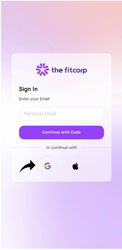
- •Tap the Google icon at the bottom of the screen
- •Select your Google account
- •Authorize The FitCorp to access your Google account
- •You'll be signed in and taken to complete your profile

Expected result: You're signed in and taken to complete your profile.
Option 3: Continue with Apple
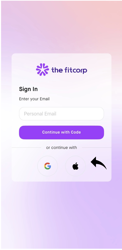
- •Tap the Apple icon at the bottom of the screen
- •Authorize The FitCorp to access your Apple account
- •You'll be signed in and taken to complete your profile

Expected result: You're signed in and taken to complete your profile.
Complete Your Profile
- •You'll see the "Complete Your Profile" screen
- •Fill in the required information:
Name: Enter your full name
Personal Email: (pre-filled from your sign-in)
Fitness Level: Select from dropdown (optional)
Bio: Enter a short bio (optional)
- •Tap the "Save" button
Expected result: Your profile is completed and saved.
Upload Your Profile Picture (Optional)
- •On the profile screen, tap the profile picture circle at the top
- •Choose to take a photo or upload from your gallery
- •Select or take your profile picture
- •Confirm the image
- •Your profile picture is now set
Expected result: Your profile picture is uploaded and displayed.
Who Can Sign Up?
Athletes (Mobile App)
- Sign up through the mobile app
- Track fitness challenges
- Compete with teammates
- View progress and achievements
Coaches & Admins (Web)
- Go to The FitCorp web portal
- Follow the web sign-up process
- Admin access to manage challenges
Troubleshooting
I didn't receive the sign-in code email
- Check your spam or junk folder
- Wait 1-2 minutes for the email to arrive
- Verify the email address was entered correctly
- Try signing in again
- Try a different sign-in method
- Check that your email account is active
The sign-in code expired
- Tap "Resend" to request a new code
- A new code will be sent to your email
- Enter the new code within 3 minutes
I forgot my email
- Try Google or Apple sign-in instead
- Use the email associated with those accounts
- Contact support with your account details
I'm getting an error message
- Check your internet connection
- Try refreshing or reopening the app
- Try signing in again
- Uninstall and reinstall the app if needed
- Contact support if the issue persists
I can't sign in with Google or Apple
- Make sure you're using the same email
- Check that your account is active
- Try the email code sign-in method instead
- Check your internet connection
- Try different WiFi or mobile data
- Restart your device
- Contact support if the issue persists
Quick Reference
| Step | Action | Time |
|---|---|---|
| 1 | Download app | 2-5 minutes |
| 2 | Open app | 10 seconds |
| 3 | Choose Sign-In Method | 5 minutes |
| 4 | Complete Your Profile | 1 minute |
| 5 | Upload Profile Picture | 1 minute |
| Total | Complete sign-in | ~10-15 minutes |
Need More Help?
If you encounter any issues not covered in this guide:
- •FAQ Section: Check the app's help center for common questions
- •Video Tutorials: Visit our YouTube channel for visual guides
- •Contact Support: Reach out to our support team at support@thefitcorp.com
Welcome to The FitCorp!
You're now ready to start tracking your fitness challenges and competing with your team. Download the app, sign up, and join the fitness revolution!